


neurolist꞉ AI Planner for ADHD
4.61.09K Reviews
App Specs
- Version
- 1.5.61
- Updated On
- License
- Free
- Downloads
- 100,000+
- Developer
- System Two GmbH
- Categories
- Productivity
- Platform
- Android
Screenshots
 Analysis by AppCompare
I find the hardest part of planning is often not knowing what to do, but getting a vague intention into a form I can act on. A planner built with ADHD in mind has to make that transition feel manageable rather than adding another system to maintain. neurolist: AI Planner for ADHD is aimed at that problem, and I think its appeal lies in bringing task planning and structure into one place without asking you to become a productivity expert first.
It is a free productivity app from System Two GmbH, with optional in-app purchases. Its 4.6 average from around 11 thousand ratings suggests that many people find it useful, while more than 100 thousand installs show it has reached a substantial audience. The age rating is Everyone. Those details are a useful starting point, but the more important question is whether its planning approach fits the way you actually handle a busy day.
A planner works best when you start small
My advice is to begin with a few real tasks rather than trying to transfer your entire life into the app at once. Add the things you genuinely need to remember, then use the planner to decide what deserves attention first. This makes it easier to judge whether the structure helps you move forward or simply gives you another place to organize things.
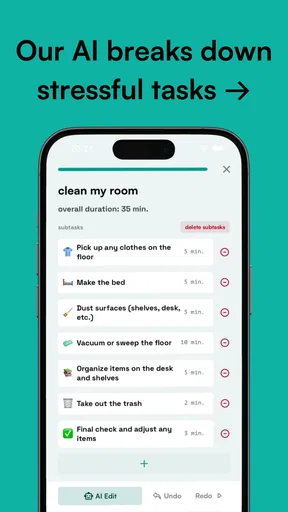
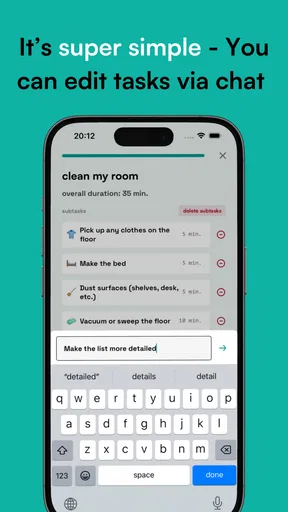
The app’s central idea is to make tasks feel more approachable for neurodivergent users. That can be especially useful when “work on a project” is too broad to act on. Breaking a commitment into clearer next steps can lower the mental barrier to starting, though the usefulness depends on whether the suggested breakdown feels sensible to you. I would treat AI assistance as a starting point, not an authority: review the result, adjust it, and keep the next action concrete.
Turn planning into a repeatable daily routine
A practical routine is to look at the day once, choose a realistic priority, and leave room for the unexpected. A long list can look productive while making it harder to choose where to begin. I prefer using a planner to answer three simple questions: what must happen today, what would be helpful, and what can wait? That distinction makes the app’s planning tools more useful than simply collecting every possible task.
For example, imagine opening the app before work and remembering a bill, a message you owe someone, and a larger task that has been hanging over you. I would enter each separately, then decide what can be done in a short gap and what needs a proper block of time. If the larger task is still intimidating, I would break it down until the first step is something I can start without negotiating with myself. The point is not to fill every hour; it is to make the next move visible.
Settings are most useful when they reduce noise
Notification choices deserve a little thought. A reminder that arrives at the right moment can bring a task back into view, but a stream of alerts can become background noise or another source of stress. I would start with reminders for commitments that are genuinely time-sensitive, then add more only if they help. If you routinely dismiss alerts without acting, that is a sign to change the timing or reduce the number, not to blame yourself for failing at the system.
Worth Reading Before You Choose

EA SPORTS FC Mobile 26 Is a Bigger Football Game, but It Takes Time

Flipboard Shows What News Apps Must Do Beyond the Feed

Switching to Android Auto Means Rethinking Your Driving Routine

Google Calendar Makes a Crowded Week Easier to Manage

Ludo King Makes the Most of the Minutes Between Plans

Baby Panda World Brings Quick Play to Modern Phones, but Its Game Library Feels Busy
It is also worth noticing which planning views and goal prompts you naturally return to. Personalization only helps when it removes friction; changing every available option at the start can turn setup into a project of its own. I would use the app for a week with a simple routine, then adjust one thing at a time. That makes it easier to see whether a setting is helping rather than merely looking appealing.
Where it differs from a basic to-do list
A conventional checklist is often faster for capturing a quick errand, and a calendar is better when you need to see fixed appointments against a day or week. neurolist is more appealing when the difficulty is shaping tasks into a plan and maintaining momentum. Its AI-assisted approach and goal-oriented structure give it a different role from a plain list, but they also ask you to engage with the planning process rather than just type and leave.
I would not replace a calendar you already rely on until you know how the app fits your routine. The original experience describes calendar and productivity-tool connections, but the exact setup can vary, so it is sensible to test your own workflow before depending on synchronization for an important commitment. If your main need is shared household scheduling, collaborative project tracking, or a highly customized professional task system, a tool built specifically for that job may be a better fit.
Who is likely to get the most from it
I can see this working well for someone who has trouble turning broad intentions into manageable actions, wants reminders and goals in the same planning environment, or is tired of lists that keep growing without helping them start. It may also suit people without ADHD who want a more guided way to approach everyday tasks. The useful test is whether the app helps you choose and begin, not whether it makes your plan look complete.
It is less suitable if you prefer a bare-bones checklist, dislike being prompted to plan, or already have a dependable calendar and task system that meets your needs. It is also not a substitute for clinical care or a guarantee of improved focus. Some people will find AI suggestions helpful; others will spend time correcting them. If planning tools themselves tend to become a distraction, start with only a handful of tasks and see whether the structure earns its place.
First Impressions: A Smart Design
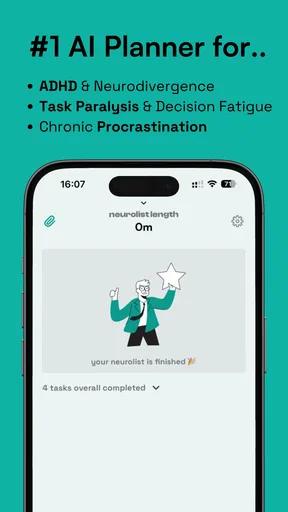
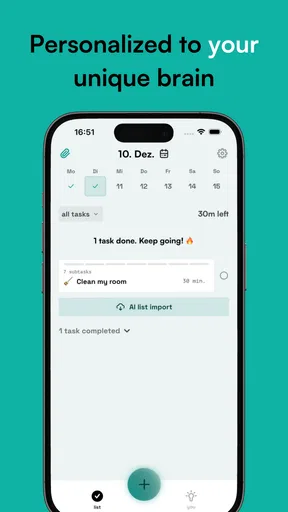
Upon launching neurolist, the first thing that caught my eye was its clean and intuitive interface. It’s designed to be user-friendly, which is a huge plus for those who might get overwhelmed by cluttered screens. You don't need a manual to navigate through the app, which is a win in my book.
The color scheme is soothing, and the layout is straightforward. You’ll find your tasks, reminders, and goals neatly organized, making it easier to focus on what needs to be done. The developers clearly put thought into creating an environment that minimizes distractions.
Features That Stand Out
Now, let’s dig into what makes this app tick. One of the standout features is its AI-driven task management. The app doesn’t just let you jot down a to-do list; it actively suggests prioritization based on your habits and preferences. It’s like having a personal assistant who knows you better than you know yourself.
Another cool feature is the goal-setting module. You can set both short-term and long-term goals and track your progress with visual feedback. It’s incredibly satisfying to check off tasks and see your progress in a tangible way.
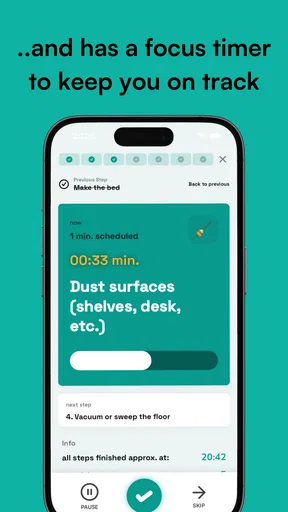
For those who struggle with time management, the app includes time-blocking features. You can allocate specific times for tasks and receive reminders, ensuring you stay on track without feeling overwhelmed.
Integration and Connectivity
The app doesn’t work in isolation, which is great for those of us who juggle multiple devices. It seamlessly integrates with calendars and other productivity tools, ensuring that your schedule is always synchronized. Whether you’re on your phone, tablet, or computer, your information is just a tap away.
Also, the app’s ability to connect with health apps adds an extra layer of functionality. If you’re the kind of person who likes to see how your productivity aligns with your physical health, this integration is a real bonus.
Customizability
One of the things I appreciate most is the level of customizability. You can tailor the app’s notifications and alerts to suit your needs. Whether you prefer gentle nudges or loud reminders, neurolist adapts to your style. This level of personalization can make a huge difference in maintaining focus and motivation.
What About Performance?
In terms of performance, the app runs smoothly without any noticeable lag. It’s lightweight, which means it won’t hog your device’s resources. Whether you’re adding a new task or checking off completed ones, everything happens instantly.
I also appreciated the app’s reliability. In my time using it, I didn’t encounter any crashes or bugs. Stability is crucial, especially when you rely on an app to keep your life organized.
Accessibility and Support
The app is available for both Android and iOS, catering to a wide audience. The developers have also ensured that the app is inclusive, with features that support users with varying needs. If you ever need assistance, the customer support is responsive and helpful. They’re always ready to assist with any questions or issues that may arise.
Moreover, the app’s community forum is a great resource for tips and tricks. It’s reassuring to know that you’re not alone in your journey to better organization.
Cost, platform, and a sensible trial
The app is free to download, with optional purchases ranging from $3.99 to $69.99 per item. I would use the free experience to establish whether its planning style suits me before paying for anything. A purchase is worthwhile only if it unlocks something you will use regularly; a larger price by itself does not make a productivity system a better fit.
It is currently version 1.5.57 and requires Android 8.0 or later. The app is also available on iOS. If you are switching devices or planning to use it alongside another calendar, check that your actual setup behaves as you expect before trusting it with essential appointments. The practical question is not how many tools it can connect to, but whether the information you need is visible when you need it.
Small habits that make the planner easier to keep
One useful approach is to give each planning session a clear stopping point. Capture the task, decide its next action, and move on instead of endlessly refining its wording. For a recurring kind of responsibility, use the same simple phrasing each time so it is easy to recognize. This is a habit rather than a hidden app feature, but it can make a planner feel consistent instead of demanding fresh decisions every morning.
I would also avoid scheduling every task into a time block. Reserve blocks for work that genuinely needs protected time, and leave small errands as flexible items. Over-planning can make an ordinary delay feel like a failed day; a little slack helps the schedule survive interruptions. When a task repeatedly slips, reconsider its size or timing instead of copying it forward unchanged.
What the AI can and cannot do
AI suggestions can reduce the effort of deciding how to approach a task, but they still need human judgment. A suggested priority may not account for a deadline, another person’s availability, or the energy you have that day. I would check whether each recommendation matches the real-world stakes, then edit or ignore it when it does not. That keeps the app useful without turning its suggestions into rules.
The same caution applies to progress indicators. A visible record of completed steps can encourage momentum, but it is not a complete measure of how well a day went. Some important work is hard to divide neatly, and some days are disrupted by things outside your control. I find the best use of tracking is to notice patterns and adjust the plan, not to judge myself by a streak or a perfect-looking schedule.
Deciding whether it earns a place in your routine
The most revealing trial is a normal, slightly busy week—not an unusually motivated day when any planner seems helpful. Use it for a few recurring obligations and one larger task, then ask whether you started sooner, remembered more, or spent less time deciding what to do. If the answer is no, you may be better served by a simpler checklist or the calendar you already use. Switching systems has a cost, so the new one should solve a real problem.
For a person who benefits from structure but needs tasks made less intimidating, neurolist has a thoughtful premise and several useful planning tools. Its strongest role is as a guide for turning intentions into next steps, rather than as a universal replacement for every productivity app. I would keep the setup modest, tune reminders based on experience, and let the routine prove its value before committing more time or money.
Final Thoughts
All in all, neurolist: AI Planner for ADHD is a robust and thoughtful solution for anyone looking to enhance their productivity. It’s more than just a planner; it’s a partner in your quest for organization. Whether you have ADHD or just need a little help keeping track of your busy life, this app offers the tools you need to succeed.
So, if you’re ready to take control of your schedule and boost your productivity, give neurolist a try. It might just be the tool you’ve been looking for. Happy planning!
Pros
- Intuitive interface simplifies task organization.
- AI suggestions improve productivity over time.
- Customizable reminders enhance time management.
- Integrates seamlessly with calendars and apps.
- Offline mode ensures access without internet.
Cons
- Limited free version features restrict usage.
- Some users may find AI suggestions repetitive.
- Initial setup can be time-consuming for new users.
- Occasional syncing issues with external calendars.
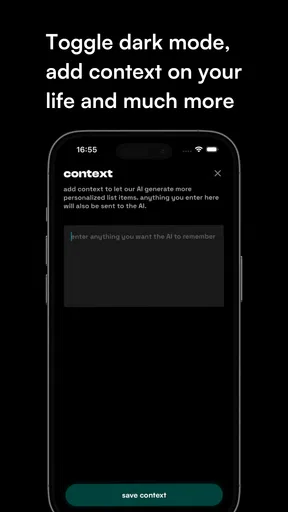
- No dark mode option for night-time use.
FAQs for neurolist꞉ AI Planner for ADHD
What is NeuroList: AI Planner for ADHD?
NeuroList is a digital planning tool designed to help individuals with ADHD manage their daily tasks and routines. Using AI technology, it offers personalized reminders, organizational tips, and a user-friendly interface to enhance productivity and focus. It's available on both Android and iOS platforms.
How does NeuroList assist individuals with ADHD?
NeuroList uses AI algorithms to tailor planning and organizational strategies to suit the unique needs of users with ADHD. It provides smart reminders, visual cues, and priority sorting to help manage time effectively. The app's intuitive design aims to reduce the overwhelming feeling often associated with planning.
Is NeuroList customizable for different user needs?
Yes, NeuroList offers various customization options to fit individual preferences and requirements. Users can adjust settings for notifications, task importance, and visual themes. The app's flexibility allows users to personalize their planning experience, making it more effective for their specific ADHD-related challenges.
Does NeuroList require an internet connection to function?
NeuroList primarily operates offline, allowing users to access their tasks and reminders without an internet connection. However, periodic online connectivity is recommended for syncing data across devices and receiving updates, ensuring that the app runs smoothly and efficiently.
Is NeuroList suitable for children with ADHD?
While NeuroList is designed for users of all ages, its interface is user-friendly enough for older children and teenagers. Parents should explore the app first to determine its suitability for younger users, as it may require some initial guidance to set up and understand its features.


